No matter how powerful a phone is, if the battery dies, it’s just a useless brick. Whether it’s taking photos, streaming shows, gaming, navigation, or mobile payments—once that battery icon turns red, all functions come to a screeching halt. Over the years, I’ve grown increasingly mindful of my phone’s battery health and gradually developed a personalized routine for battery usage and maintenance. In 2025, many new phones support ultra-fast charging and smarter battery management systems, but that doesn’t mean we can afford to mistreat our batteries.
I’ve used flagship smartphones from various brands—including this year’s iPhone 16 Pro Max, Samsung Galaxy S25 Ultra, and Xiaomi 14 Ultra. While all these devices have become smarter at managing battery usage, I’ve learned that long-lasting battery performance still depends heavily on daily habits.
1. What’s the Real Lifespan of a Smartphone Battery?
Let’s start with the basics. Most smartphones today use lithium batteries, which typically last for 500 to 800 full charge cycles. That means if you charge your phone from 0% to 100% once a day, that’s 365 cycles a year—your battery will noticeably degrade after about two years.
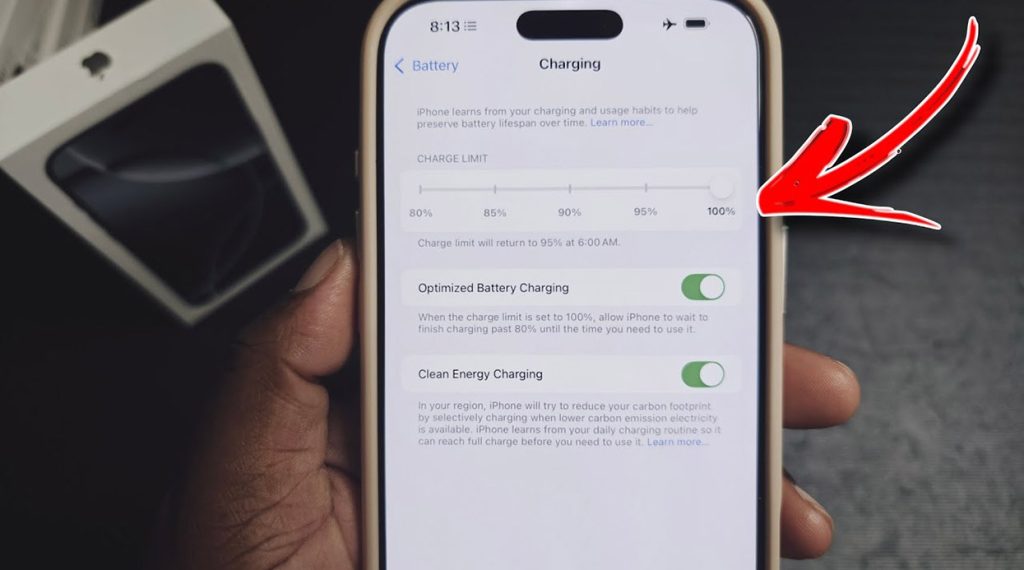
By 2025, many flagship devices have integrated AI-based battery optimization. For instance, the iPhone 16 Pro Max features “Optimized Battery Charging,” which keeps the charge at around 80% overnight and tops it off just before you wake up. This helps reduce battery aging. Samsung’s Galaxy S25 Ultra and Xiaomi’s 14 Ultra offer similar features, supported by chip-level thermal control and adaptive charging algorithms. These are great aids—but daily usage remains the real key to battery longevity.
2. Six Proven Battery Care Tips That Work for Me
Below are six principles I’ve personally followed for over a year, with noticeable results:
- Avoid Staying at Very Low or Full Charge
Many people think letting their phone drain to 1% and then charging to 100% is “clean and efficient.” In fact, it’s a battery killer. My rule: keep the charge between 30% and 80% whenever possible. I top up during the day with quick charges and stop at around 30% at night. - Don’t Play While Charging—Especially Games
High workload + charging = battery nightmare. I’ve seen friends’ phones overheat and even swell from playing games while charging. Even though the iPhone 16 Pro Max uses titanium for cooling and Xiaomi 14 Ultra features dual VC cooling, battery cells still heat up under such strain, which hurts long-term health. - Avoid Third-Party Chargers
Especially cheap fast chargers with poor voltage control—they can fry your battery. I always use official chargers with Type-C cables for my main devices, and I carry PD-certified chargers from Anker or UGREEN when traveling (both available at amazon.com). - Enable Smart Charging Features
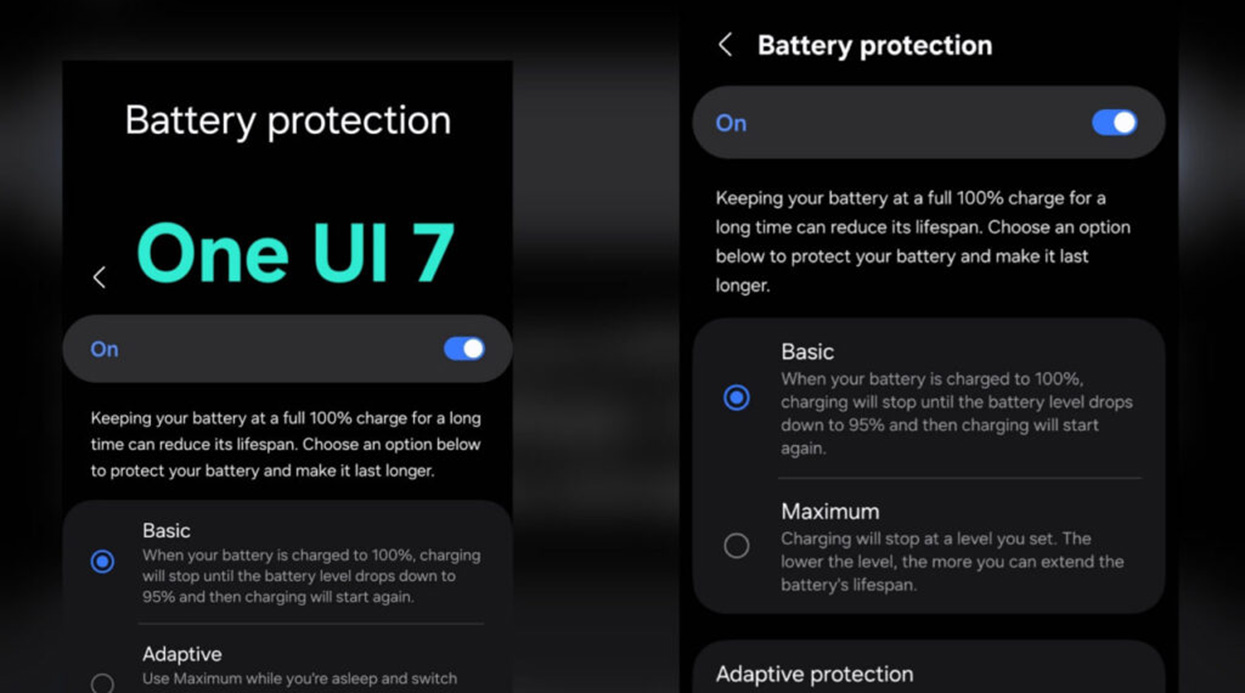
Most 2025 flagships include AI-based battery protection. iPhones enable Optimized Charging by default; Samsung’s One UI offers a “Battery Protection” mode that caps charging at 85%; Huawei and Xiaomi also provide similar settings. I activate these as soon as I set up a new phone. - Keep Batteries Away from Extreme Heat or Cold
Heat above 40°C or cold below 0°C both damage lithium batteries. I never leave my phone in a hot car in summer, and in winter, I keep it close to my body for warmth. iPhones and Samsung phones show “Temperature Too High/Low” warnings—but don’t wait for those alerts. Prevent problems before they happen. - Calibrate the Battery Every 2–3 Months
Every few months, I perform a full cycle (drain to 1%, then charge to 100%) to help the system recalibrate its battery stats. It makes battery percentage readings more accurate and can slightly improve performance.
3. 2025 Flagship Battery Usage: My Real-World Experience
Here’s what I observed using three flagship smartphones this year:
iPhone 16 Pro Max
- Battery Capacity: Around 4676mAh, slightly improved from the previous generation
- Highlights:
- A18 Pro chip improves energy efficiency
- iOS 18’s AI-based background optimization enhances battery life
- MagSafe charging is smoother and more refined
- Optimized Battery Charging still works flawlessly
- Downside: No true way to fully disable background apps; some apps wake and drain power silently
Samsung Galaxy S25 Ultra
- Battery Capacity: 5000mAh
- Highlights:
- Supports 45W wired + wireless charging
- Built-in Battery Protection limits charging to 85%
- Adaptive screen refresh rate (1–120Hz) is excellent for power saving
- Downside: Despite the large battery, power drains quickly during heavy tasks (e.g., shooting 8K video)
Xiaomi 14 Ultra
- Battery Capacity: 5300mAh
- Highlights:
- Supports 90W wired + 80W wireless charging
- Proprietary thermal battery management performs well during gaming
- AI power-saving engine in HyperOS is impressively effective
- Downside: High-power fast charging can cause heat—best to switch to standard charging overnight
4. How Bad Is Battery Degradation, Really?
Many people ask me: “If my battery drops to 85% after two years, should I replace the phone?” My answer: not necessarily.
In iOS, Apple recommends replacing the battery once health drops below 80%. I still use an old iPhone 13 Pro with 84% battery health, and it lasts all day under moderate use. What really matters is whether your phone suddenly shuts down, drains rapidly, or won’t hold a charge.
Samsung and Xiaomi don’t show exact battery health percentages, but you can check using third-party apps like AccuBattery (Android) or Coconut Battery (Mac).
In short: ignore the percentage—focus on the performance.
5. Battery Tips for Travel and Emergencies

I travel often, so I carry some must-have gear to keep my battery ready for anything:
- A GaN multi-port fast charger (I use UGREEN Nexode 100W)
- A PD-enabled power bank (Anker 737 with bi-directional fast charging)
- A car-mounted wireless charger with magnetic mount for quick top-ups
- Low Power Mode and Background Refresh turned off when power gets low
These habits not only give me peace of mind on the road but also protect my battery during extreme use.
6. My Battery Usage Cheat Sheet
- Follow the 80% rule—don’t overcharge or over-drain
- Avoid fast charging while gaming
- Turn on built-in battery protection features
- Maintain moderate device temperature
- Don’t rush to replace your battery—optimize habits first
7. Battery Health Is the Foundation of a Great Phone Experience
We all crave 120Hz screens, AI processing, and stunning cameras—but none of it matters without power. Batteries aren’t just about specs—they reflect how you use your device every day. In 2025, brands have made huge strides in managing power intelligently, but the ultimate protector of your battery is still you.
If you haven’t already built healthy battery habits, I hope this field-tested guide can be your starting point. In a way, taking care of your battery is taking care of yourself. A healthy battery means a reliable phone—and a smoother, more efficient rhythm to life.