
The mouse is perhaps the computer accessory I interact with the most every day, yet it’s also the one that’s easiest to overlook. From the first email in the morning to late-night video editing or graphic design, the mouse is always there beside me. After trying out numerous mice firsthand, I’ve become increasingly aware that a well-suited mouse doesn’t just improve efficiency—it directly impacts wrist comfort and workflow continuity. In 2025, the mouse market is evolving fast, with brands focusing on making their products lighter, more precise, and multifunctional. Whether for office work, design, editing, or gaming, each scenario demands different features.
1. Choosing the Right Mouse: Not the Most Expensive, But the Most Suitable
When I choose a mouse, I never blindly chase price tags or brand names. I always evaluate from three key perspectives:
- Ergonomics and Grip Comfort: This is my top priority. Using a mouse for over ten hours a day, the grip and how well it fits my hand are crucial. Some mice suit larger hands, while others are better for fingertip or claw grips.
- Responsiveness and Precision: Whether I’m retouching photos, editing videos, or simply navigating a browser, the mouse’s accuracy and response speed determine the overall smoothness of the task.
- Connectivity and Battery Life: Most modern mice support both Bluetooth and 2.4GHz connections, making device switching more convenient. Battery life also determines whether I’m willing to carry it with me on trips.
2. Logitech MX Master 4: The Ultimate Choice for Multitasking
In early 2025, I picked up the Logitech MX Master 4 as soon as it launched. This latest iteration of the MX Master series improves on its predecessor (the MX Master 3S) in connection stability, scroll wheel feedback, and multi-device sync.
Why I Love It:
- Exceptional Ergonomics: I have relatively large hands, and the MX Master 4’s contoured shape fits perfectly. I can use it for long hours without feeling any fatigue.
- Seamless Device Switching: It supports up to three devices and lets me switch between them (MacBook, Windows PC, etc.) instantly using a button on the bottom.
- Intelligent Scroll Wheel: The scroll wheel automatically switches resistance modes based on how fast I scroll. Navigating long documents or web pages is a pleasure.
- Outstanding Battery Life: A full charge easily lasts almost two months—I often forget it even needs charging.
For someone like me who constantly switches between apps and platforms, the MX Master 4 is the ultimate office productivity mouse. It’s worth every penny for content creators, video editors, or anyone managing large amounts of documents.
Purchase platform: amazon.com. Comes with a USB-C cable, eco-friendly packaging.
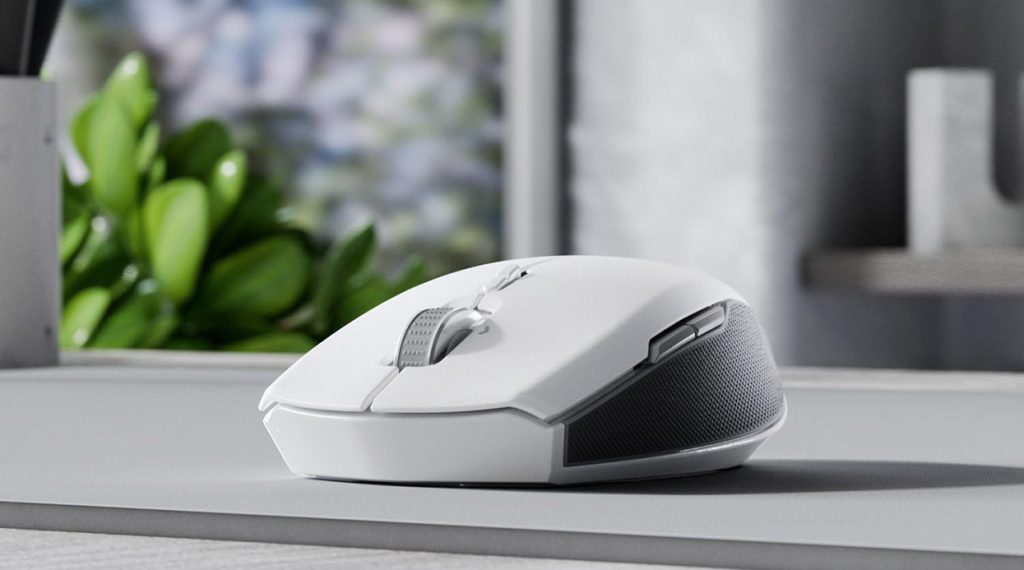
3. Razer Pro Click Mini 2025: Lightweight Yet Powerful
I used to think “portable mouse” meant compromising functionality—until I got the 2025 edition of Razer’s Pro Click Mini. It’s compact but uncompromising, making it my go-to mouse for travel and remote work.
Why It Stands Out:
- Compact Yet Solid: The weight is well balanced. It feels premium without being heavy, and it stays stable on any surface thanks to its anti-slip base.
- Silent Clicks for Quiet Environments: The buttons are tactile yet whisper-quiet—perfect for meetings or libraries.
- Up to 4000 DPI Adjustable: Despite its size, it’s incredibly precise. I’ve used it for Photoshop editing while traveling without any problems.
- Dual-Mode Wireless: Supports both Bluetooth and 2.4GHz. Battery life is excellent—several weeks per charge.
This mouse is a great balance of portability and functionality, especially for people like me who constantly switch between home and office setups.
4. Logitech Lift Vertical: My Wrist-Saving “Therapy Tool”
Spending long hours at a desk took a toll on my wrist and forearm. In early 2025, I tried the newly released Logitech Lift Vertical (ambidextrous version), and it became a permanent fixture on my desk.
My Experience:
- Vertical Grip Design: Unlike traditional mice, it keeps my forearm in a natural position, relieving a lot of strain I used to feel.
- Silent Buttons: Almost inaudible clicks—ideal for working late at night or in quiet environments.
- Size Variants for Different Hands: This generation comes in S/M/L options. Picking the right size felt like having a custom-fit tool.
- Great Battery Life + USB-C Charging: One charge lasts about a month, with easy plug-and-play charging.
I’d recommend this mouse to anyone who works long hours in Excel, PowerPoint, or frequently clicks. It’s especially helpful for users who often feel wrist fatigue.
5. Keychron M6 Tri-Mode: Built for Multi-System Setups
This year, I started regularly switching between Windows, macOS, and iPad for work. I needed a mouse that could handle all three. Enter the Keychron M6 Tri-Mode Wireless Mouse, launched in 2025.
Why I Recommend It:
- Triple Connectivity: Supports Bluetooth 5.1, 2.4GHz, and wired connections. Easily binds to multiple devices.
- Lightweight Yet Feature-Rich: Weighs about 70g despite having scroll wheels and side buttons.
- Customizable Buttons Across Platforms: Using the Keychron Driver, I’ve assigned shortcut keys like quick screenshots on iPad or app switching on Windows.
- Solid Battery Life: One charge lasts over two weeks on 2.4GHz mode.
This is now my go-to mouse for “multi-platform workflows.” It saves a lot of time when working across both tablets and laptops.
6. ROCCAT Kone XP Air: For RGB and High-Speed Gaming
Though I’m not a hardcore gamer, I do like winding down with a few rounds of shooters or racing games. Office mice can’t meet the demands of fast-paced gaming, so I opted for the ROCCAT Kone XP Air Wireless (2025 edition) for my casual sessions.
Gaming Performance:
- 19 Programmable Buttons: Ideal for FPS or MOBA titles.
- Charging Dock Included: Just place it on the dock—no cables needed. It’s a surprisingly convenient feature.
- Customizable RGB Lighting: Vibrant but tasteful. I can switch it off or change styles depending on my mood.
- Low-Latency Wireless: ROCCAT’s proprietary chip ensures zero lag. I played Overwatch 2 without any hiccups.
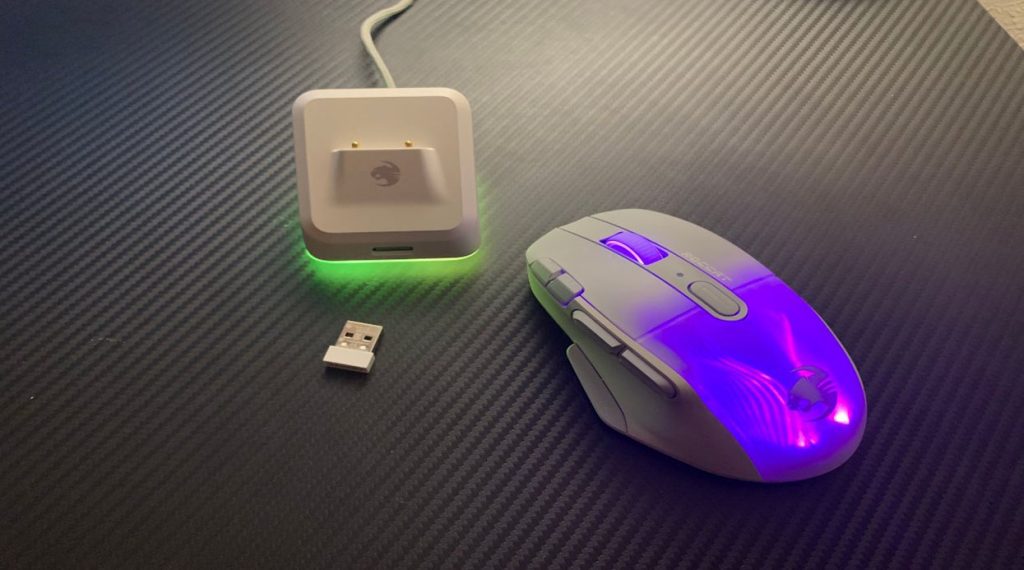
Even though I’m not a pro gamer, I still demand precise control and fast response. This mouse gives me a “professional-grade” feel for my casual gaming.
7. Matching Mice to Usage Scenarios—My Recommendations
After a year of extensive testing and switching mice frequently, I’ve grouped my recommendations based on specific scenarios:
| Use Case | Recommended Mouse |
| Daily Office Work/Documents | Logitech MX Master 4 |
| Travel/Remote Work | Razer Pro Click Mini 2025 |
| Ergonomic/Health Support | Logitech Lift Vertical |
| Multi-Platform Workflow | Keychron M6 Tri-Mode |
| Gaming & Entertainment | ROCCAT Kone XP Air |
Each mouse serves a unique purpose—no single model is perfect for every situation. The key is understanding your own needs and being willing to invest in your comfort and productivity.
8. Small Tool, Big Impact
Many people see the mouse as a “non-essential” accessory. But for me, it’s the most direct bridge between myself and the digital world. A good mouse not only boosts productivity but also protects my health during long sessions and enhances enjoyment during play.
In 2025, the mouse is no longer just a pointer—it’s a powerful, versatile, and intelligent tool. If you’re planning to upgrade your workspace, I hope my hands-on reviews and experiences provide some inspiration.
Whether you’re a productivity professional, designer, video editor, someone seeking healthier ergonomics, or just a casual gamer, finding the right mouse is the first step in moving from just “using a computer” to truly mastering your digital workflow.